Stock figures, shipment status and resulting prices
· 5 min read

Products show more stock figures: allocated, free to sell, expected and economic. Order lists can show whether each order is shipped, and a price sheet shows the price each product discount comes to. Categories get images, videos and documents, and the Action Hub loads all your actions again.
New Features
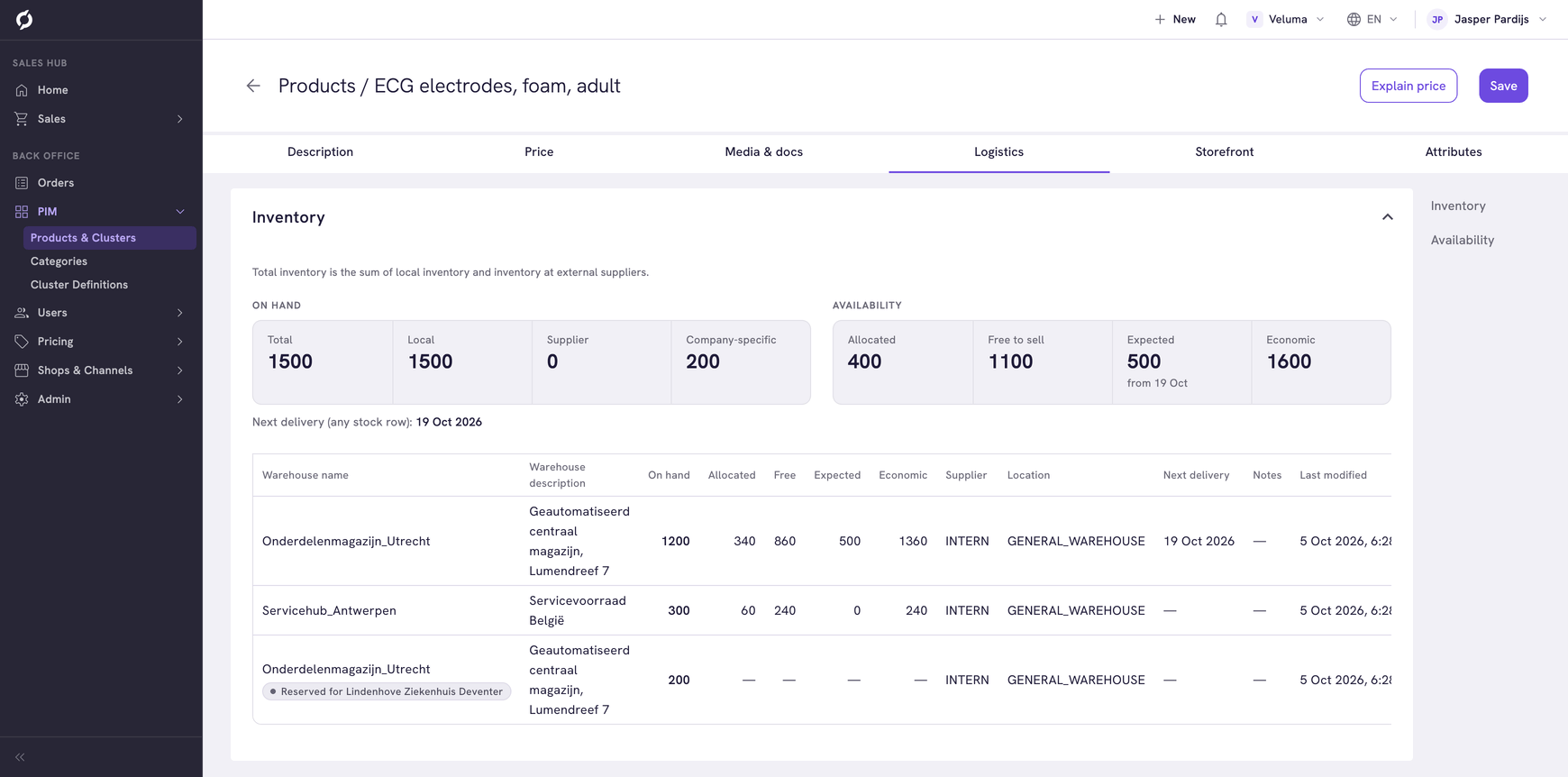
- More stock figures for a product. Next to the stock on hand, Propeller now shows Allocated, Free to sell, Expected and Economic when your stock data includes them. Allocated is sold but not yet shipped, free to sell is on hand minus allocated, expected is ordered but not yet received and economic is free to sell plus expected. The Logistics tab of a product groups its figures under On hand and Availability, and the table of stock rows shows them per warehouse. A row reserved for one company says Reserved for and the company name, and does not count in the product totals. See Stock and availability.
- Stock per warehouse from the product catalogue. On a product page in the Sales Hub, click the Stock: line to open Stock per warehouse, with the totals at the top and a row per warehouse below. It takes the place of the stock table that used to fold open on the page. See Check the stock.
- Shipment status on the order lists. Add the Shipment status column with the Table editor to see whether each order is Not shipped, Partially shipped or Fully shipped. Point at a status to see how many shipments the order has and how many are dispatched. A shipment counts once it is on its way, not while it is only created or being processed. You cannot sort or filter on this column yet. See Choose the columns.
- The resulting price on a price sheet. Each product discount on a price sheet shows its Resulting price: the unit price the customer pays, with the markup on the cost price and the difference with the list price. A warning shows when that price is below the cost price, when a missing cost or list price makes it zero, or when the product's own bulk price is lower at a quantity the line covers. Click a product name to open the product. See Price Sheets.
- Images, videos and documents for categories. A category has a Media & docs tab, the same as a product, to add images, videos and documents. See Manage categories.
Improvements
- Prices in the order editor follow your price decimals. When your environment uses more than two decimals for prices, the order editor shows them. A price worked out from a margin, markup or discount is rounded to those decimals, so the price you see is the price that is saved, and price times quantity matches the line total. The percentage can then differ slightly from what you typed, for example 33.02% instead of 33%. Subtotal, VAT and total stay in cents. With two decimals, prices no longer differ by a cent between columns. See The order editor.
- The full export message on the order lists. The Export message column shows up to two lines, and pointing at it shows the whole message. Long messages used to be cut off.
- Product filters in your data language. The values of text filters in the PIM product list and the product catalogue now show in your data language. When you switch the data language, the text filters you picked are removed, because their values differ per language, and a message tells you. Your other filters stay.
- At most 50 per page in the lists of orders. The lists of requests, quotes and orders offer 5, 10, 25 or 50 rows per page, so a page keeps loading reliably. 100 is no longer offered.
Bug Fixes
- The Action Hub loads more actions again as you scroll down. The end of the list shows how many actions are shown, with a Load more button.
- After you go back from a product page in the product catalogue, changing page loads the products instead of showing loading placeholders.
- In the shipment dialog, a cluster option you just added to an order is no longer marked as not saved until you reload the order editor.
- Searching categories in the PIM finds results again when you type a search you cleared before.
- Explain price shows the result for the user you picked, also when you switch from a contact to a customer.
- Shipping cost, Transaction cost, Extra discount and Valid until in the order editor line up with their switches again.
- Pages that should open at the top, such as a product, a category or the next step of Data Import, now do.
- The Table editor of the order lists shows the Total column with its currency instead of the text
{currency}. - When you add a Backoffice user whose email address already has an account, the message that Propeller support can give that account access now also shows when your interface is in Dutch, German or French.