A new look, a new Home page and notifications for your actions
· 4 min read

Propeller has a new look. The menu, the top bar, the sign-in page and the Home page are redesigned, and the top bar now tells you when an action is assigned to you. You can also keep the interface in one language while you read and edit your data in another.
New Features
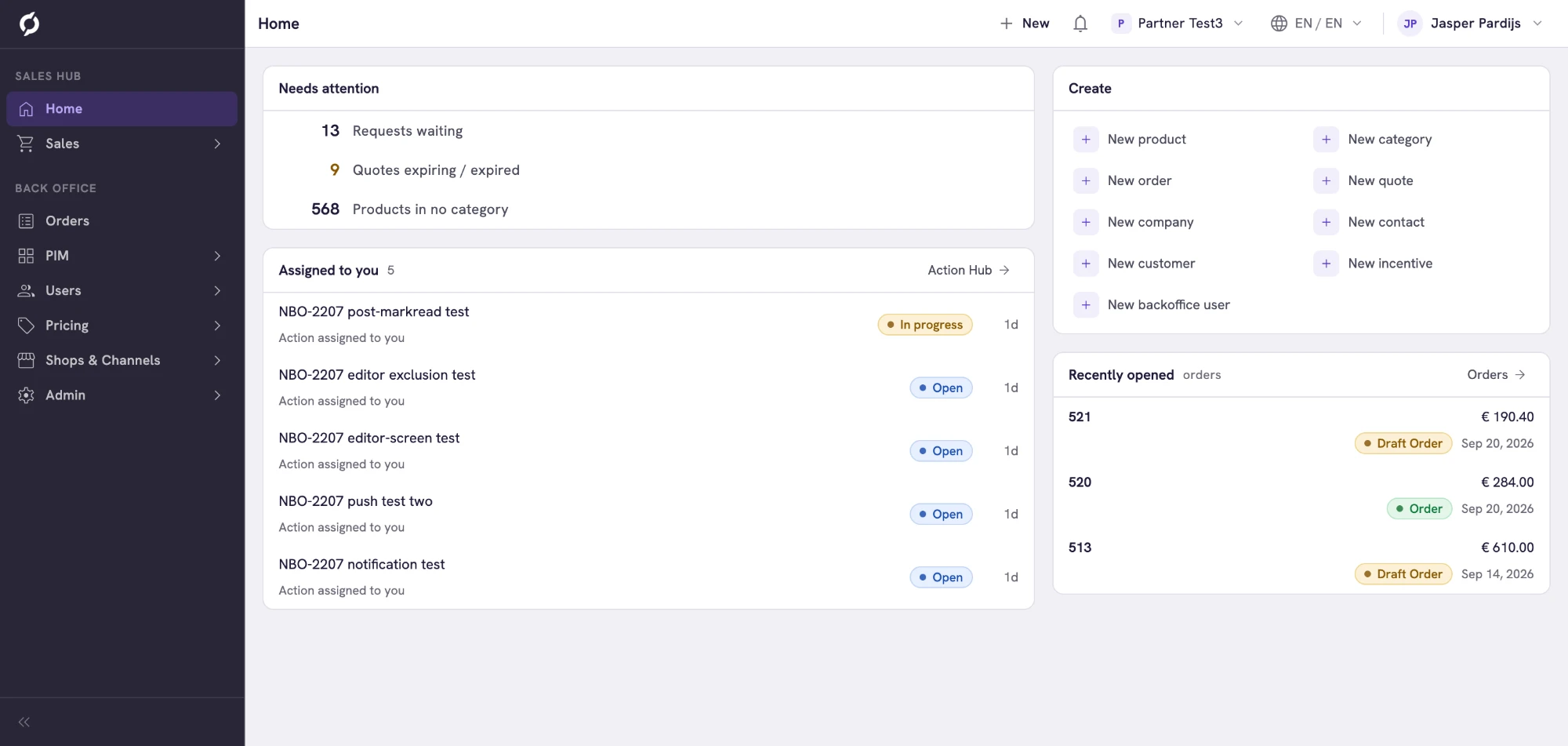
- A new look for the whole application. The menu on the left has two parts, one for the Sales Hub and one for the Backoffice, and you open a section by clicking it. Collapse menu at the bottom shrinks the menu to icons. A new top bar holds New for creating a record from any page, your notifications, the environment you work in, the language and your account menu. Every menu item is where it was, so the paths in the Help Center still apply. See Find your way around.
- A Home page that shows what needs doing. Instead of counts over a period, the Home page now shows what is waiting. Needs attention counts requests waiting for an answer, orders whose export failed, quotes that expire within a week or already expired and products that are in no category. Assigned to you lists your actions from the Action Hub, Create has the same shortcuts as New and Recently opened takes you back to the last orders you opened, also after you sign out. Every number opens the list behind it. See Use the Home page.
- Notifications for actions assigned to you. When an action in the Action Hub is assigned to you, the bell in the top bar shows it, usually within a minute. Click the notification to open the Action Hub, which also shows how many of your actions are new. See Get notified about new actions.
- Separate languages for the interface and your data. Keep the menus and labels in one language while you read and enter product data in another. In the language menu in the top bar, click Set data language separately and pick an Interface and a Data language. Match data to interface links them again. See Switch language.
- A new sign-in page. Signing in, entering your verification code and resetting your password look new. When something goes wrong, the message says what failed and what to do next, and your email address stays filled in. See Sign in to Propeller.
- Reorder order status sets. Drag the rows on the Order Status Set tab into the order you want, the same way you already reorder order statuses. See Order Statuses.
note
Forms no longer have their own Editing language selector. The data language in the top bar now decides both what you read and what you type. To fill in another language for one field, use the translations icon in that field.
Improvements
- Order search starts at three characters and has a clear button. Searching orders, quotes and requests now waits until you have typed three characters, like the search on companies, contacts and customers. Click the × in the search field to clear it at once. This applies in the Sales Hub, on the Backoffice Orders page, on the Orders tab of a company and in the order and quote pickers. Clearing a search also no longer shows an empty list for a moment.
- The Details panel is open when you open an order. The Details panel with the customer, the contact and the addresses is now open by default, so you see who ordered before what they ordered.
- Safer reordering of order statuses. Dragging is off whenever the list is filtered, also after you clear a sort, so you cannot renumber statuses you cannot see. System statuses no longer show a drag handle, because they keep their place. A row you drop now stays where you dropped it instead of briefly jumping back.
- A clear message when a Backoffice user already exists. One Backoffice account can have access to more than one environment. If you add someone whose email address already has a Backoffice account, for example because they work in another environment, you now get a message telling you to contact Propeller support, who can give that account access to your environment. See Backoffice Users.
Bug Fixes
- Notes on a company are saved again.
- Orders that kept loading when you opened them open normally again.