Stock per warehouse and product ordering
· 4 min read

You can now open the stock figure on a product to see where that stock sits, per warehouse, with its supplier and next delivery date. This release also lets you set the order of products in a category, adds read-only price sheets, brings cross-sell and up-sell to cluster products and fixes a set of issues in business rules, price sheets and the product listings.
New Features
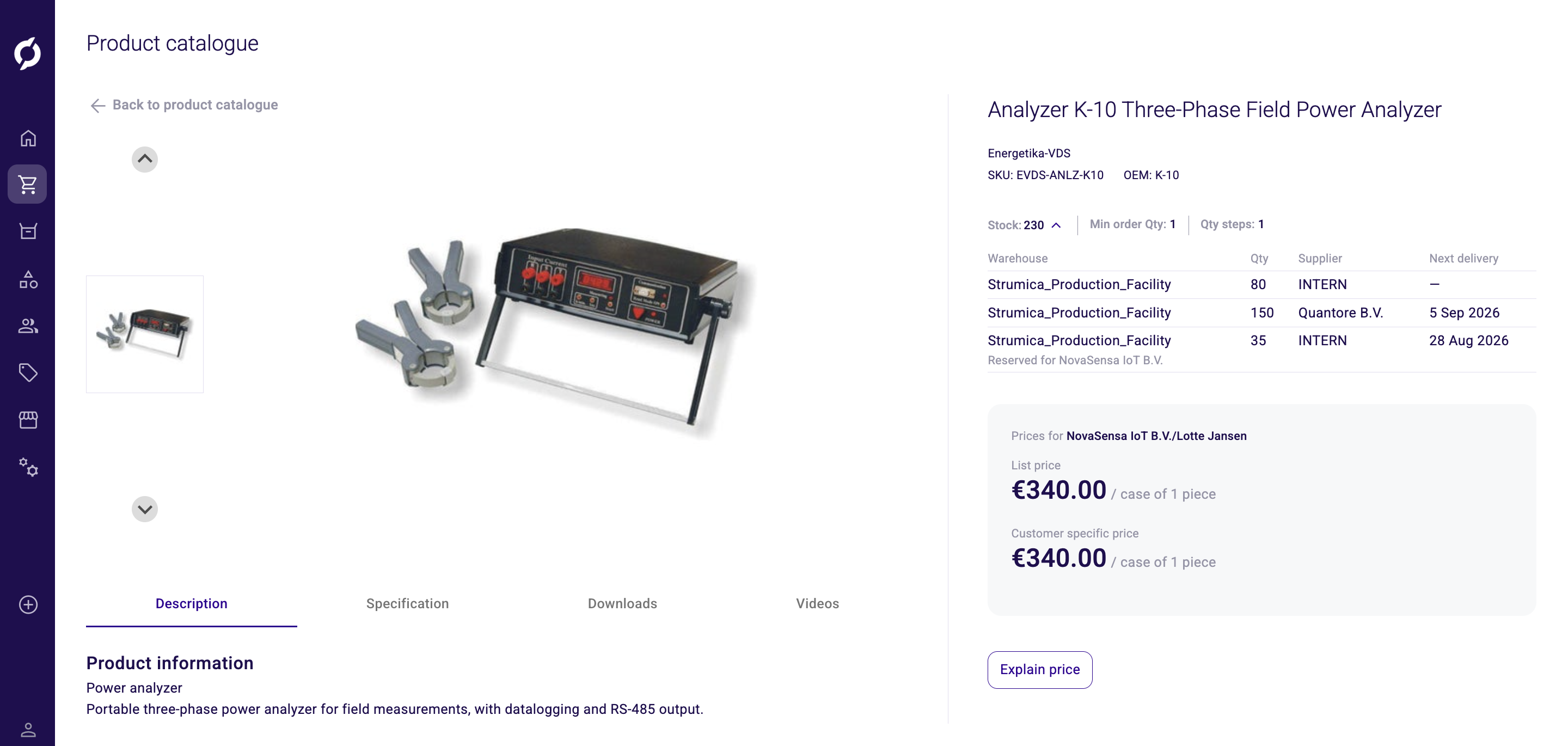
- Stock per warehouse. Click the stock figure on a product to expand it, in the product catalogue and in the PIM. You see every inventory record for that product with its warehouse, quantity, supplier and next delivery date. When you browse for a specific company or contact, stock reserved for that customer is listed as well. The list is read-only, because inventory comes from your ERP or warehouse system.
- Set the order of products in a category. In the PIM you can now decide in which order products appear within a category. Drag a product to the position you want, or use Move to top and Move to bottom. You can drag products into order inside a cluster and inside a cluster option as well. There Move to top and Move to bottom are not available, so use drag and drop.
- Read-only price sheets. A price sheet can be marked as read-only. A read-only price sheet cannot be changed or deleted in the Backoffice. The setting comes from your ERP import and cannot be switched on or off here.
- Cross-sell and up-sell on cluster products. Products inside a cluster now have the Storefront tab, so you can add, change and delete their cross-sell and up-sell relations, the same as on regular products and clusters. The Sales Hub shows only the relations set on the cluster itself. In your webshop you can choose to show the relations set on cluster products as well.
- Channel column on order listings. The quote request, quote and order listings have a new optional Channel column. Turn it on from Choose columns.
Improvements
- Shipment source on the order details page. A shipment now shows its date and its source without you opening it, so you can see where it shipped from at a glance. The shipment ID moved into the expanded shipment details.
- SKU on price sheet discounts. The discounts on a price sheet show the SKU next to the product, so you can tell which products the sheet covers.
- Complete an action without picking it up. In the Action Hub you can complete a ticket directly, instead of having to pick it up first.
- Pick a country from a list in business rules. Conditions on a delivery address country now use a dropdown instead of a free text field, so the value you pick always matches what the rule engine compares against.
- Clearer label in the rule builder. When you use Order items as a condition, its dropdown is no longer labelled Action, which was also the label of the THEN action field below it.
- Channel preselected on a new API key. Creating an API key preselects the first channel, so it is clear which channel the key uses.
- Links to the Help Center and Developer Docs. You can reach the Help Center and the Developer Docs straight from the Backoffice. Log in to the Help Center with your Propeller account.
Bug Fixes
- The rule builder no longer stays stuck behind a loader after a rule fails to save, so you can correct the value without reloading the page.
- Naming a new business rule no longer leaves behind an empty rule that cannot be edited. A rule is created once it is valid.
- Day and month values in business rule conditions are now checked against their valid range before you save.
- An attribute column added in one environment no longer shows up as a raw attribute id after you switch to another environment.
- Middle names show for customers in the Users overview.
- Resetting the filters on a listing also resets range filters.
- The discounts on a price sheet display correctly again.
- Editing an existing price sheet no longer shows a validation error on its name.
- The attribute descriptions list for a category shows only the attribute descriptions of that category.
- The description field on an attribute description shows its validation message.
- The supplier code and OEM on a product no longer show a double colon.
- A misaligned dropdown field is aligned again.