Delete API keys and a sharper company search
· 2 min read

You can delete API keys again, and searching for a company no longer trawls through contact and address data, so the results are the companies you asked for. This release also shows the shipping method under its own name instead of the stored code.
New Features
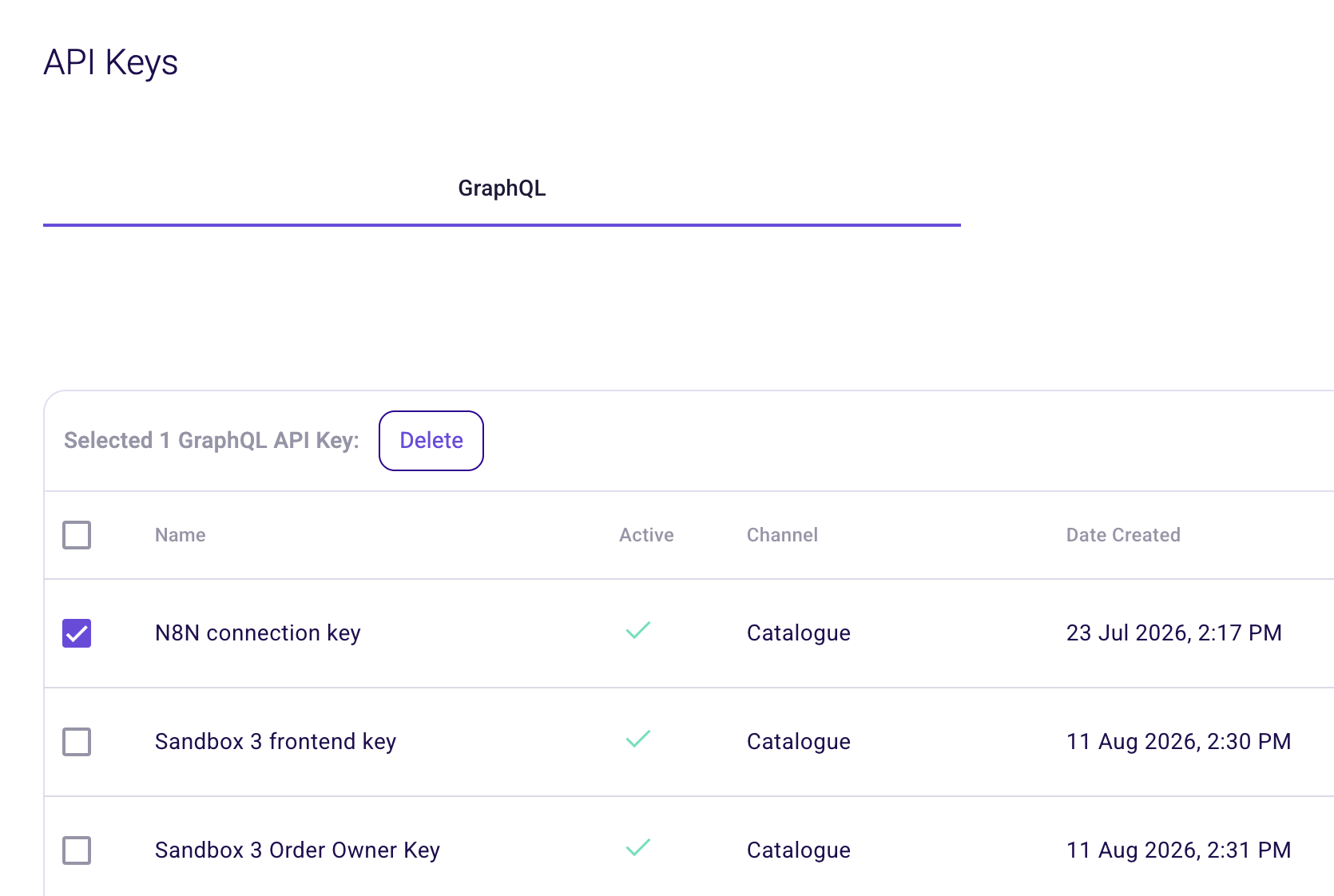
- Delete API keys. Select one or more keys on the API Keys page and delete them, so keys created for a quick test do not pile up. See API Keys.
warning
Deleting a key is permanent. If you only want to stop a key from working for now, switch off its Active toggle instead, because that you can undo.
Improvements
- Company search looks at company fields only. Searching companies no longer searches contact and address data by default. Looking for a company called Bronkhorst now returns companies with that name, instead of every company that happens to employ someone with the same name. You can still add contact and address fields yourself from the field selector.
- Shipping method shows its own label. The order listings and the order editor show the shipping method description from the value set in your language, for example "Bezorgen" rather than the stored value "Regular". Picking one keeps the label you chose.
Bug Fixes
- The reference on an order is kept after you save the order and open it again.
- Default tags on an attribute description show up when the language was stored in lower case, and saving no longer adds a second set of the same tags.