A new Action Hub and a choice of what happens when you send a quote
· 4 min read

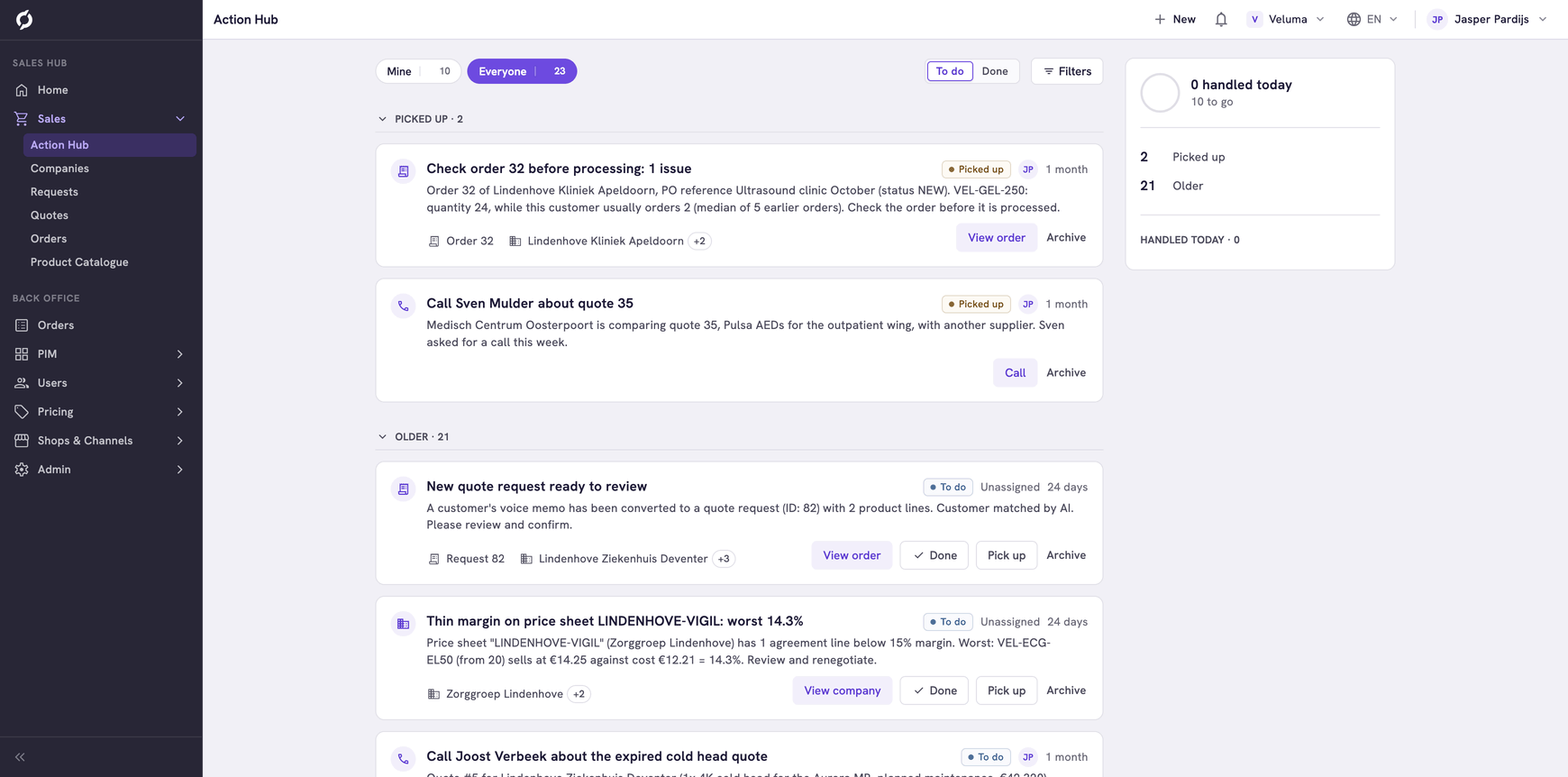
The Action Hub shows what you still have to do, grouped by date, and how much you handled today. When you send a quote or an order confirmation, you choose which emails go out and which connected systems are updated. A price sheet can price a product at a cost price of its own plus a percentage. Many dialogs and the warehouse page have a new design.
New Features
- A new Action Hub. The Action Hub is a list of cards to work through. Mine shows the actions assigned to you and Everyone all actions you can see. To do sorts them by date, with the actions you picked up at the top, and Done shows what was done or archived. Each card names the records it is about, such as an order or a company, and opens them with one click. Done, Pick up and Archive sit on the card, and Undo takes a step back. In the Older section, a link such as Archive 12 older than a month clears old actions in one go. On the right, a ring shows how many actions you handled today and how many are still to go. See Action Hub.
- Choose what happens when you send. When there is a choice to make, Send to client on a quote or an order opens a dialog with Which emails should be sent? and Update connected systems. The usual choice is ticked. Change it for this one send, for example to update your ERP as well or to send no email. Changes you have not saved yet are saved first. Under Shops & Channels > Event Actions, the new switch Run by default decides which actions are the usual choice. An action with the switch off only runs when someone ticks it while sending. See Use the order editor and Run an event action only when a sales rep picks it.
- A cost price of your own on a price sheet. A product line on a price sheet can have the discount type Custom cost price plus a percentage. Type the cost price in the new Cost price column and the percentage under Value. The customer pays that cost price plus the percentage. Explain price shows the line as Custom cost price + with the percentage. In the Sales Hub, a tag next to the cost price tells you that it comes from a price sheet. See Price sheets.
- A new design for dialogs and the warehouse page. The dialogs in which you create or edit a record, such as a payment method, a carrier, a tax, an attribute, an API key or an event action, have a new design. Details you cannot change, such as the ID and the dates, sit together under System at the bottom, and the footer counts the changes you have not saved yet. A warehouse opens as a page with General, Address and Opening hours, where presets, copying to the weekdays and lunch breaks make the opening hours quicker to set. See Warehouses.
Improvements
- Files up to 10 MB. The media tab of a product or a category shows Maximum file size: 10 MB. A larger file is not uploaded and a message names it, while the other files of your selection upload as usual. Before, a large file failed with a general error.
Bug Fixes
- Export table on a list no longer adds an empty column or columns with the names of icons.
- A new order that you save right after creating it stays a Draft Order. Before, a quick Save could create it with the status New.