Redesigned User Roles and API Key Management

Redesigned the roles and permissions panel for backoffice users with role presets, granular module permissions and a live menu access preview. Also added a new API key management page for GraphQL and REST integrations.
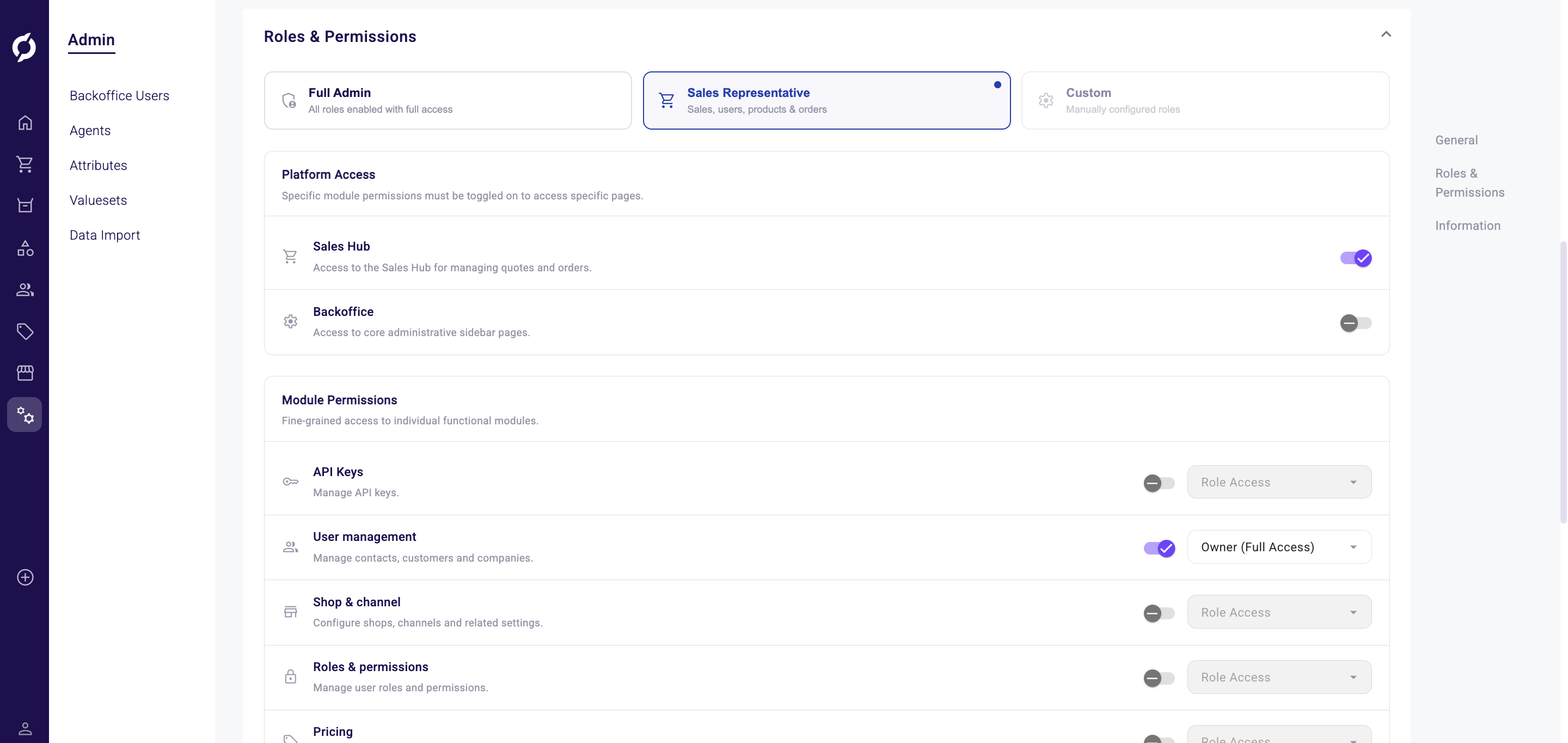
Redesigned User Roles & Permissions
The roles and permissions section on the backoffice user detail page has been completely redesigned. Instead of a flat list of role toggles, you now get a structured panel with three parts:
- Role presets let you quickly apply a Full Admin or Sales Representative configuration with one click. When neither preset matches, it shows as Custom.
- Platform Access controls whether a user can reach the Sales Hub or Backoffice sidebar. Disabling the Backoffice toggle greys out all module permissions below it.
- Module Permissions give fine-grained access to nine functional areas (API Keys, User management, Shop & channel, Roles & permissions, Pricing, Logistics, Configuration, Product Data and Order Data), each with an Owner, Editor or Viewer access level.
A new Menu Access Preview panel at the bottom shows in real time which sidebar items the user can see based on their assigned roles. Each item lists the required platform and module roles, so you can verify the configuration before saving.
The old event-triggered invite flow has been replaced with an explicit Send/Resend Invite button for a clearer onboarding experience.
Read the full guide: Backoffice Users
API Key Management
A new dedicated API key management page is available under Admin. You can create and manage two types of keys:
- GraphQL API keys with role-based access control. Each key can be assigned roles (Product Data, Logistics, Configuration, Order Data, Pricing, Role & permission, Shop & channel, User) with access levels (Viewer, Editor or Owner). Roles are locked after creation.
- REST API keys with auto-generated Client ID and Client Secret.
Both key types support active/inactive toggling and the generated credentials are hidden by default with reveal and copy buttons.
Read the full guide: API Keys
Improvements
- Added channel filtering on order, quote and quote request listing pages
- Order editor now enforces minimum quantity and unit constraints when adding a product by SKU
- Improved cluster row height and enabled drag-and-drop for cluster groups in the order editor
- Disabled drag handle for bonus items in the order product list to prevent errors
Bug Fixes
- Fixed deleted product line items causing errors when editing quantity in the quote editor
- Fixed missing delete confirmation popup on shipping cost business rules
- Fixed filter behavior on the favorite lists page
- Fixed "Keep me logged in" logging users out after approximately 30 minutes
- Fixed template query variables not visible or editable in the Monaco editor
- Fixed filter count displaying wrong numbers or -1, now shown as inline chips
- Fixed sending order confirmations failing when language field was empty; also fixed back navigation from new contact to company details
- Fixed colour attribute editing by replacing broken color picker with native HTML input
- Fixed cluster and product routes returning 404 when the Dutch title was removed
- Removed deprecated shop field from the surcharge detail form