Localized Product Media and Quote Expiry Warnings
· 2 min read

Product videos and images can now be uploaded per language, and quotes nearing their expiry date show a warning so you can follow up in time. The Sales Hub displays color filters as swatches, the rich text editor supports hyperlinks and several Backoffice bugs are fixed.
New Features
- Localized product videos and images. Upload a separate video or image per language for any product in the Backoffice. Translations stay optional, so a single asset can still cover every language when that is all you need.
- Hyperlinks in product and category rich text. The rich text editor on products and categories now supports hyperlinks. Use the link button in the toolbar to add, edit or remove a link on selected text.
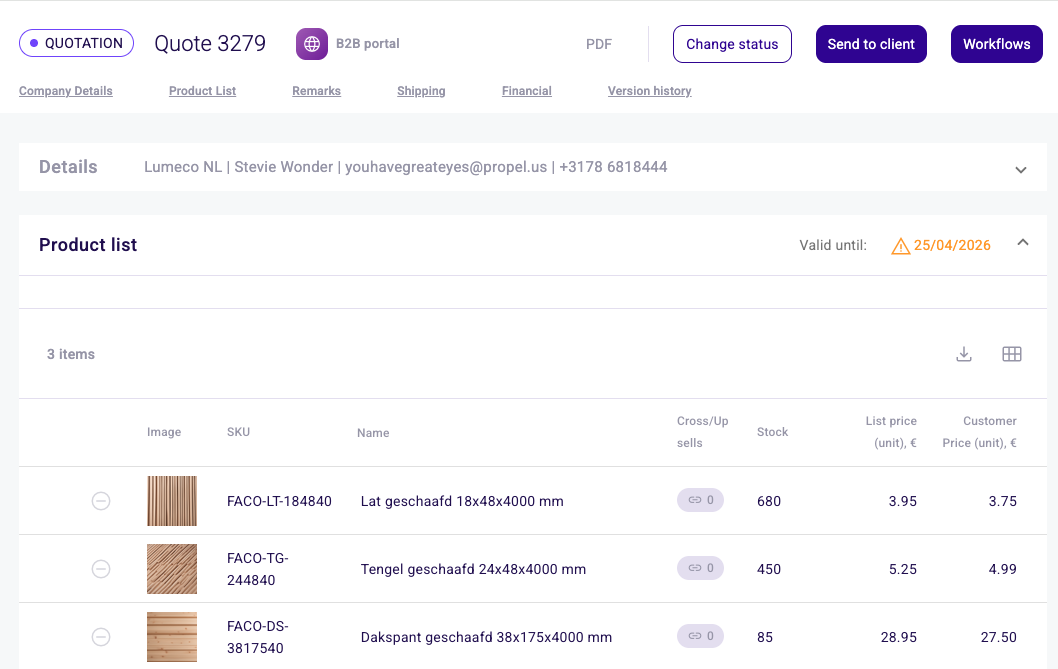
- Nearly expired warning on quotes. Quotes within 7 days of their validity date now show a yellow warning icon with a "Nearly expired" tooltip on hover. This gives sales reps a chance to follow up before the quote actually lapses.
- Color swatches in Sales Hub filters. Color attributes in Sales Hub product filters now show as swatches instead of text values, so you can pick the right shade at a glance.
Bug Fixes
- A quote remains valid through its expiry date instead of being marked expired on the day itself.
- Product images now match across the Sales Hub, Backoffice and webshop. Previously a product could show duplicate images in some places and a different set on the webshop.
- Clicking a column header on the Companies list now sorts it correctly, and the sort arrows update to reflect the active column.
- You can now open Roles and Permissions on a newly created Backoffice user without an error. The user is saved first so the roles screen has something to attach to.
- Warehouse detail pages now refresh automatically when you navigate back to them, so you no longer need to reload manually.
- You can now delete incentive business rules. The delete action previously failed silently.
- The Backoffice no longer prompts you to save changes when you have not made any.