Price sanity check
With one click on the product list, this agent looks for price mistakes before a customer sees them: products without a price, a cost price above the list price and bulk prices that are off.
| In short | |
|---|---|
| Where you use it | On the Products & Clusters list in the Backoffice, behind the Workflows button |
| Starts | With a click on the agent |
| Changes in Propeller | Nothing. It only reads |
| Uses AI | No |
| Texts | English or Dutch, a setting |
| Runs in n8n | One per click |
| Difficulty | Easy |
What you get
A count per check, with the worst examples of every check that finds something.
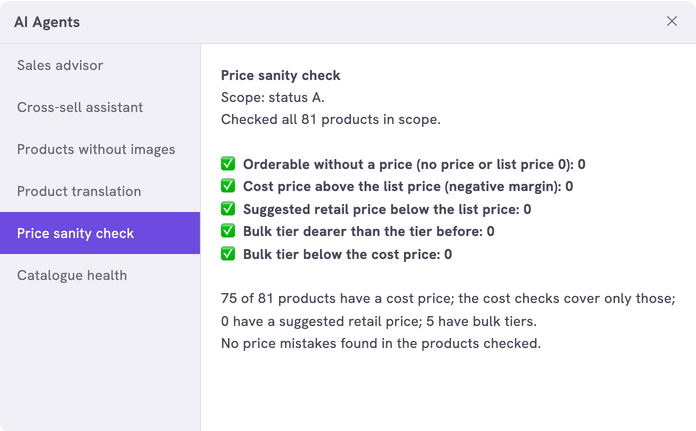
| Check | Flags a product when |
|---|---|
| Orderable without a price | It can be ordered and has no price or a unit price of 0 |
| Cost price above the list price | Its cost price is higher than its unit price. With MIN_MARGIN_PERCENT it flags a low margin instead |
| Suggested price below the list price | Its suggested price is lower than its unit price |
| Bulk price dearer than the one before | A bulk price is higher than the price for a smaller quantity |
| Bulk price below the cost price | A bulk price is lower than the cost price at that quantity |
The answer shows cost prices and margins to whoever starts the agent.
What you need
- An n8n account with the credential
Propeller API key. See Set up n8n. - An API key with Viewer access on Product Data.
- Backoffice access and the Configuration role with Owner access, to register the agent.
How it works
The agent checks the products with the status Available, up to 500 per click: the ones changed most recently. In a larger catalogue the answer says it checked a sample. Use the settings to check one part of the catalogue in full, such as a category or a manufacturer.
The workflows and agents in the Agent Hub are free to use and adapt. They are examples, not supported product features. Test them in a test environment and check the results before you use them on real customers.
Install it
Install a workflow from the library explains each step.
- Import the file into n8n.
- Check that the nodes Count Scope and Fetch Product Page use the credential
Propeller API key. - Follow Register the agent in Propeller with the values below.
- Go to PIM > Products & Clusters, click Workflows and click the agent.
| Field | Value |
|---|---|
| Trigger | Button |
| Interaction mode | Single turn |
| Placements | Back office · Products, the Products & Clusters list |
| Webhook Timeout (ms) | 60000 when you raise MAX_PAGES. A page of 100 products takes about half a second |
The answer shows in the dialog. An error instead of an answer means the address, the login or the key is not right. It can also mean that the workflow is not published.
Make it yours
| Setting | Default | What it does |
|---|---|---|
LANGUAGE | 'EN' | The language of the answer and of the product names: 'EN' or 'NL' |
CURRENCY | 'EUR' | The currency sign of the amounts |
TAX_ZONE | 'NL' | The tax zone of the bulk prices that are checked |
STATUSES | A | The product statuses that are checked. A is Available |
CATEGORY_IDS | [] | Check only these categories, with their subcategories. Empty checks every category |
MANUFACTURERS | [] | Check only the products of these manufacturers |
PRODUCT_IDS | [] | Check only these products |
RECENT_DAYS | 0 | Check only the products changed in this number of days. 0 checks them all |
MIN_MARGIN_PERCENT | 0 | 0 flags a cost price above the unit price. 20 flags every margin below 20% |
CHECKS | All five | The checks that run: noPrice, margin, srpBelowList, bulkRising and bulkBelowCost |
EXAMPLES | 5 | The examples shown per check |
MAX_PAGES | 5 | The pages of 100 products read per click |
Limits
- Above 500 products in scope, the agent checks the 500 changed most recently. The answer says so.
- Only the bulk prices of the product itself are checked, not the prices in price sheets.
Related pages
- Catalogue health scorecard - another agent for the product list
- Set the prices of a product
- Register an AI agent