Catalogue health scorecard
With one click on the product list, this agent scores the quality of your product data: names and descriptions per language, images, categories, prices, EAN codes, manufacturer codes and stock. It names the gaps to fix first.
To list every product that has no image, use Products without images.
| In short | |
|---|---|
| Where you use it | On the Products & Clusters list in the Backoffice, behind the Workflows button |
| Starts | With a click on the agent |
| Changes in Propeller | Nothing. It only reads |
| Uses AI | No |
| Texts | English, Dutch or French: a setting, or the language of the button label that was clicked |
| Runs in n8n | One per click |
| Difficulty | Easy |
What you get
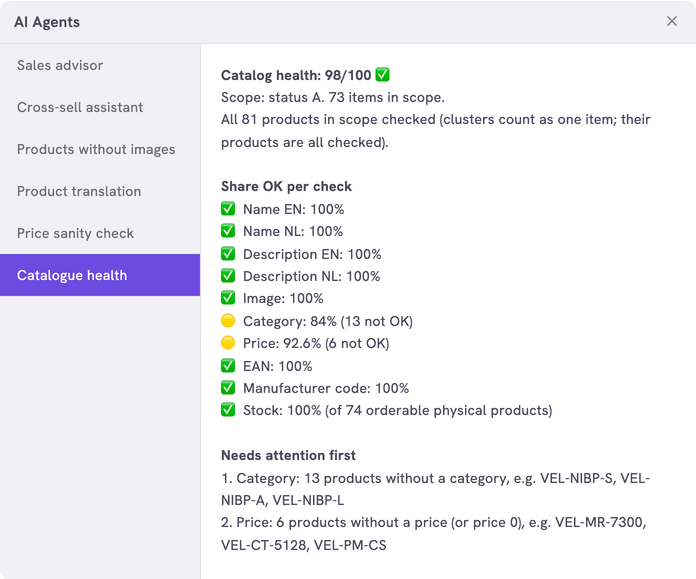
A score out of 100, the share of products that pass each check and the weakest checks with example SKUs.
| Check | A product passes when |
|---|---|
| Name, Description | It has a name and a description in each language you set |
| Image | It has at least one image |
| Category | It is in a category |
| Price | It has a unit price above 0 |
| EAN | It has an EAN code |
| Manufacturer code | It has a manufacturer code |
| Stock | It has stock. Only checked for products that can be ordered and are physical |
The score is the average of the checks. The answer ends with the share of products that pass every check.
What you need
- An n8n account with the credential
Propeller API key. See Set up n8n. - An API key with Viewer access on Product Data and Logistics. Logistics lets the agent read the stock.
- Backoffice access and the Configuration role with Owner access, to register the agent.
How it works
The agent reads the products with the status Available, up to 500 per click: the ones changed most recently. In a larger catalogue the score covers that sample. The answer says so. Use the settings to score one part of the catalogue in full.
The workflows and agents in the Agent Hub are free to use and adapt. They are examples, not supported product features. Test them in a test environment and check the results before you use them on real customers.
Install it
Install a workflow from the library explains each step.
- Import the file into n8n.
- Check that the nodes Count Scope and Fetch Page use the credential
Propeller API key. - Follow Register the agent in Propeller with the values below.
- Go to PIM > Products & Clusters, click Workflows and click the agent.
| Field | Value |
|---|---|
| Trigger | Button |
| Interaction mode | Single turn |
| Placements | Back office · Products, the Products & Clusters list |
| Webhook Timeout (ms) | 60000 when you raise MAX_PAGES |
The scorecard shows in the dialog. An error instead of a scorecard means the address, the login or the key is not right. It can also mean that the workflow is not published.
Make it yours
| Setting | Default | What it does |
|---|---|---|
LANGUAGE | 'EN' | The language of the answer: 'EN', 'NL' or 'FR' |
LABEL_LANGUAGES | {} | The agent's button label in each language, for example { 'Catalogue health': 'EN', 'Kwaliteit catalogus': 'NL', 'Qualité du catalogue': 'FR' }. A click on the button sends its label as the message. When the message is one of these labels, the answer is in that label's language. With {} the answer is always in LANGUAGE |
LANGUAGES | 'EN', 'NL' | The languages a product needs a name and a description in |
STATUSES | A | The product statuses that are scored. A is Available |
CATEGORY_IDS | [] | Score only these categories, with their subcategories. Empty scores every category |
MANUFACTURERS | [] | Score only the products of these manufacturers |
RECENT_DAYS | 0 | Score only the products changed in this number of days. 0 scores them all |
CHECKS | All eight | The checks that run: NAME, DESCRIPTION, IMAGE, CATEGORY, PRICE, EAN, MANUFACTURER_CODE and STOCK |
EXAMPLES | 3 | The example SKUs per check |
MAX_PAGES | 5 | The pages of 100 products read per click |
SAMPLE_SORT, SAMPLE_ORDER | 'LAST_MODIFIED_AT', 'DESC' | Which products make the sample in a larger catalogue. By default the ones changed most recently |
Limits
- The score is a plain average, so one weak check weighs little. Look at the share of products that pass every check as well.
- Price is the unit price of the product, not a price in a price sheet.
- Stock is the total over all warehouses.
- In the count of products in scope, a cluster counts as one. All its products are checked.
Related pages
- Price sanity check - another agent for the product list
- Products without images
- Register an AI agent