Price history
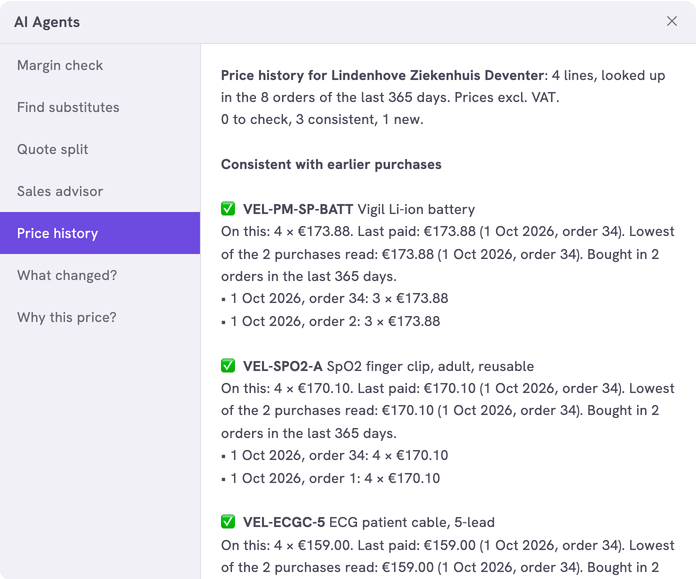
With one click on a quote or an order, this agent shows what the customer paid before for each product on it. It flags a price that is higher than the last one paid or well below the lowest, so the prices you send stay consistent.
To see how a price is built up, use Why this price?.
| In short | |
|---|---|
| Where you use it | On a quote or an order in the Sales Hub, behind the Workflows button |
| Starts | With a click on the agent |
| Changes in Propeller | Nothing. It only reads orders |
| Uses AI | No |
| Texts | English or Dutch, a setting |
| Runs in n8n | One per click |
| Difficulty | Easy |
What you get
Per product line: the last three purchases with date, order number, quantity and price, the last price paid, the lowest price paid and the number of orders of the last 365 days with the product.
| A line shows as | When |
|---|---|
| To check | Its price is above the last price paid or more than 5% below the lowest price paid |
| Consistent | Its price is neither |
| Never bought before | No order of the last 365 days has this product |
Prices are per piece and without VAT.
What you need
- An n8n account with the credential
Propeller API key. See Set up n8n. - An API key with Viewer access on Order Data.
- Backoffice access and the Configuration role with Owner access, to register the agent.
How it works
Propeller sends the lines of the quote or order that is open. For each product the agent reads the newest 20 orders of the same company that hold it, in the statuses that count as a purchase. The open quote or order itself is left out.
The workflows and agents in the Agent Hub are free to use and adapt. They are examples, not supported product features. Test them in a test environment and check the results before you use them on real customers.
Install it
Install a workflow from the library explains each step.
- Import the file into n8n.
- Check that the nodes Probe Orders and Look Up Purchases use the credential
Propeller API key. - Follow Register the agent in Propeller with the values below.
- Open a quote in the Sales Hub, click Workflows and click the agent.
| Field | Value |
|---|---|
| Trigger | Button |
| Interaction mode | Single turn |
| Placements | Sales Hub · Quote editor and Sales Hub · Order editor, a quote or an order in the editor |
The price history shows in the dialog. An error instead of an answer means the address, the login or the key is not right. It can also mean that the workflow is not published.
Make it yours
| Setting | Default | What it does |
|---|---|---|
LANGUAGE | 'EN' | The language of the answer: 'EN' or 'NL' |
CURRENCY | 'EUR' | The currency sign of the prices |
PURCHASE_STATUSES | NEW, CONFIRMED, VALIDATED, ARCHIVED | The statuses that count as a purchase. See Fill in order status codes |
HISTORY_DAYS | 365 | How many days back the agent looks |
SHOW_LAST | 3 | The purchases listed per line |
FLAG_PERCENT | 5 | How far below the lowest price paid a price may be before it is flagged |
MAX_LINES | 40 | The lines looked up per click |
LOOKUP_ORDERS | 20 | The newest orders read per product, at most 50 |
Leave the other settings as they are.
Limits
- Earlier orders are found by the SKU on the line. An order line saved under another SKU of the same product is missed.
- The lowest price is the lowest of the orders read, not of the whole year.
- A discount on a separate order line is not taken off. The price shown is the price on the product line.
- A quote of 16 lines took 5 seconds in a test. Propeller waits 30 seconds for an answer by default.
Related pages
- Why this price? - another agent for quotes and orders
- Give a customer a discount
- Register an AI agent