Duplicate company finder
With one click on the Companies list, this agent finds customers that were entered twice. It shows what matches and the orders and contacts of each company, so you can decide which one to keep.
| In short | |
|---|---|
| Where you use it | On the Companies list of the Sales Hub, behind the Workflows button |
| Starts | With a click on the agent |
| Changes in Propeller | Nothing. It never merges or deletes a company |
| Uses AI | No |
| Texts | English, Dutch or French: a setting, or the language of the button label that was clicked |
| Runs in n8n | One per click |
| Difficulty | Easy |
What you get
An answer looks like this:
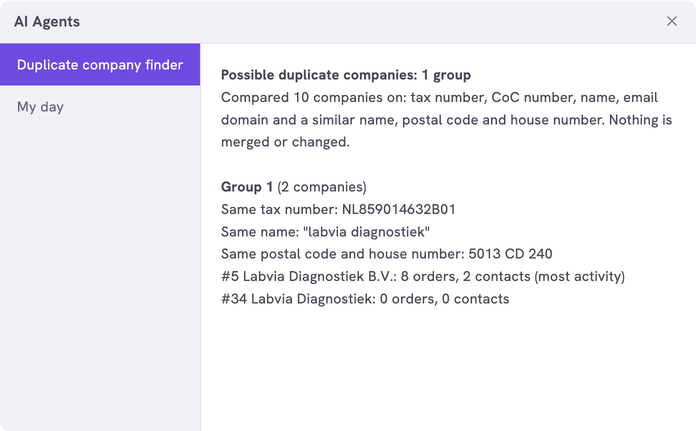
The number after # is the ID of the company, as the Companies list shows it. Without duplicates the answer says No likely duplicates.
What you need
- An n8n account with the credential
Propeller API key. See Set up n8n. - An API key with Viewer access on User management and Order Data.
- Backoffice access and the Configuration role with Owner access, to register the agent.
How it works
| Match | Two companies match when |
|---|---|
| Tax number | The VAT numbers are the same, apart from spaces and punctuation |
| CoC number | The Chamber of Commerce numbers are the same, apart from spaces and punctuation |
| Name | The names are the same once capitals, accents, punctuation and a legal form at the end, such as B.V. or GmbH, are left out |
| Email domain | The email addresses end in the same domain and the names look alike. Gmail, Outlook and Hotmail addresses do not count |
| Postal code and house number | One of their addresses has the same postal code and house number |
Companies that match on any of these end up in one group.
The workflows and agents in the Agent Hub are free to use and adapt. They are examples, not supported product features. Test them in a test environment and check the results before you use them on real customers.
Install it
Install a workflow from the library explains each step.
- Import the file into n8n.
- Check that the three nodes that talk to Propeller use the credential
Propeller API key. - Follow Register the agent in Propeller with the values below.
- Go to Sales > Companies, click Workflows and click the agent.
| Field | Value |
|---|---|
| Trigger | Button |
| Interaction mode | Single turn |
| Placements | Sales Hub · Companies, the Companies list of the Sales Hub |
The groups show in the dialog. An error instead of an answer means the address, the login or the key is not right. It can also mean that the workflow is not published.
Make it yours
| Setting | Default | What it does |
|---|---|---|
LANGUAGE | 'EN' | The language of the answer: 'EN', 'NL' or 'FR' |
LABEL_LANGUAGES | {} | The agent's button label in each language, for example { 'Find duplicate companies': 'EN', 'Dubbele bedrijven zoeken': 'NL', 'Entreprises en double': 'FR' }. A click on the button sends its label as the message. When the message is one of these labels, the answer is in that label's language. With {} the answer is always in LANGUAGE |
MATCH_ON | taxNumber, cocNumber, name, emailDomain, address | What counts as a match. Add phone to also compare the last 9 digits of phone numbers |
IGNORE_EMAIL_DOMAINS | gmail.com, outlook.com, hotmail.com | Mail providers that many companies share. The same domain says nothing there |
NAME_SUFFIXES | bv, b.v., gmbh, nv, n.v., ltd, ab, sa, sarl, bvba, inc | Legal forms that are left out at the end of a name |
NAME_SIMILARITY | 0.8 | How alike two names must be when they share an email domain, from 0 to 1 |
ORDER_STATUSES | [] | The statuses counted as orders. Empty counts every status. See Fill in order status codes |
MAX_PAGES | 20 | The pages of 100 companies that are compared. 20 pages is 2,000 companies |
MAX_GROUPS | 15 | The most groups the answer shows |
Limits
- With more than 2,000 companies, only the first 2,000 are compared. The answer says so. Raise
MAX_PAGESto compare more. - A typo in a name, such as Bakker Bouw and Baker Bouw, is only found when the two companies also share another match.
- The agent removes nothing. To remove a duplicate, delete it on the Companies list. A company with contacts cannot be deleted: move or delete its contacts first. See Delete a company.
Related pages
- My day - another agent for the Companies list
- Manage companies
- Register an AI agent