My day
With one click, this agent gives a sales rep a list for the day: open actions, quote requests that wait, quotes that expire soon and orders that need a next step.
For an action per expiring quote in the Action Hub, use Expiring quote follow-ups.
| In short | |
|---|---|
| Where you use it | On the Companies list of the Sales Hub, behind the Workflows button |
| Starts | With a click on the agent |
| Changes in Propeller | Nothing. It only reads |
| Uses AI | No |
| Texts | English, Dutch or French: a setting, or the language of the button label that was clicked. Action types and order statuses stay in English |
| Runs in n8n | One per click |
| Difficulty | Easy |
What you get
| Part of the answer | What it shows |
|---|---|
| Your open Action Hub tickets | Your actions that are open or in progress: the number per type and the oldest ones |
| Quote requests waiting | Requests with the status Request, oldest first |
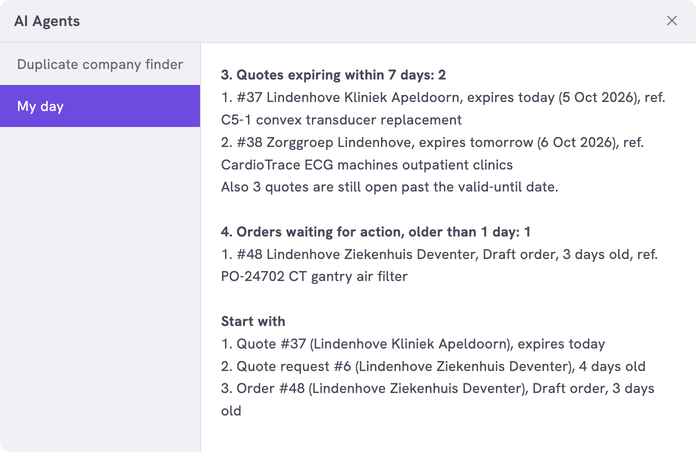
| Quotes expiring within 7 days | Quotes with a Valid Until date within 7 days, soonest first. Quotes past that date are counted on one line |
| Orders waiting for action | Draft orders and unfinished orders older than a day, oldest first |
| Start with | Three items: the quote that expires first, the oldest request, the oldest waiting order, then the oldest action |
The first four parts list up to five items each. The requests, quotes and orders are those of all companies.
The answer ends like this:
What you need
- An n8n account with the credential
Propeller API key. See Set up n8n. - An API key with Viewer access on User management and Order Data.
- Backoffice access and the Configuration role with Owner access, to register the agent.
How it works
Propeller tells the workflow who clicked, so the agent shows the actions assigned to that colleague.
The workflows and agents in the Agent Hub are free to use and adapt. They are examples, not supported product features. Test them in a test environment and check the results before you use them on real customers.
Install it
Install a workflow from the library explains each step.
- Import the file into n8n.
- Check that the three nodes that talk to Propeller use the credential
Propeller API key. - Follow Register the agent in Propeller with the values below.
- Go to Sales > Companies, click Workflows and click the agent.
| Field | Value |
|---|---|
| Trigger | Button |
| Interaction mode | Single turn |
| Placements | Sales Hub · Companies, the Companies list of the Sales Hub |
| Webhook Timeout (ms) | 60000 if you set ONLY_MY_ORDERS to true. 176 waiting orders then took 24 seconds in a test |
The list shows in the dialog. An error instead of a list means the address, the login or the key is not right. It can also mean that the workflow is not published.
Make it yours
| Setting | Default | What it does |
|---|---|---|
LANGUAGE | 'EN' | The language of the answer: 'EN', 'NL' or 'FR' |
LABEL_LANGUAGES | {} | The agent's button label in each language, for example { 'My day': 'EN', 'Mijn dag': 'NL', 'Ma journée': 'FR' }. A click on the button sends its label as the message. When the message is one of these labels, the answer is in that label's language. With {} the answer is always in LANGUAGE |
TIMEZONE | 'Europe/Amsterdam' | The time zone for today and the Valid Until dates |
TICKET_STATUSES | OPEN, IN_PROGRESS | The statuses of open actions |
REQUEST_STATUSES | REQUEST | The statuses of waiting quote requests. [] leaves the part out |
QUOTE_STATUSES | QUOTATION | The statuses of quotes the customer has. [] leaves the part out |
ACTION_STATUSES | DRAFT_ORDER, UNFINISHED | The statuses of orders that wait for someone. [] leaves the part out |
ACTION_AFTER_DAYS | 1 | How many days old an order must be to count |
EXPIRING_DAYS | 7 | How many days ahead a Valid Until date may be |
ONLY_MY_ORDERS | false | true shows only what you are the account manager of. The Sales Hub does not show this field. The answer says when no order has one |
MAX_PER_SECTION | 5 | Items per part, at most 20 |
START_WITH | 'quotes', 'requests', 'orders', 'tickets' | The order in which Start with picks its items |
MAX_PAGES | 4 | The most pages a part reads: 100 actions or 50 orders a page. The answer says when it stopped there |
See Fill in order status codes for where to find the codes.
Limits
- The age of an order counts from the day it was created, not from the day it got its status.
- With more than 200 open quotes past their Valid Until date, a quote that is about to expire can be missed. The answer says so.
Related pages
- Use the Action Hub
- Duplicate company finder - another agent for the Companies list
- Register an AI agent