Account readiness check
With one click on a company page, this agent checks whether a customer can order online. It lists what is missing and what to do about it.
To see who buys at a company and how much, use the Buying team overview.
| In short | |
|---|---|
| Where you use it | On the page of a company in the Sales Hub, behind the Workflows button |
| Starts | With a click on the agent |
| Changes in Propeller | Nothing. It only reads |
| Uses AI | No |
| Texts | English, Dutch or French: a setting, or the language of the button label that was clicked |
| Runs in n8n | One per click |
| Difficulty | Easy |
What you get
A checklist with a check mark or a warning per item.
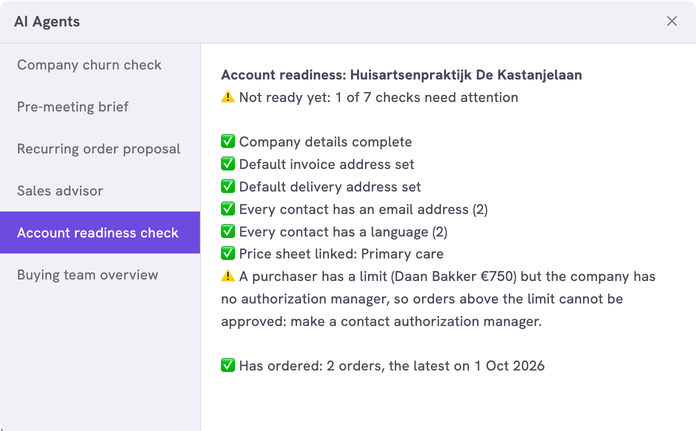
When every check passes, the answer says Ready to order online.
What you need
- An n8n account with the credential
Propeller API key. See Set up n8n. - An API key with Viewer access on User management, Order Data and Pricing. Pricing lets the agent see the price sheets.
- Backoffice access and the Configuration role with Owner access, to register the agent.
How it works
| Check | Passes when |
|---|---|
| Company details | The debtor ID, VAT number, Chamber of Commerce number, email address and phone number are filled in |
| Addresses | The company has a default invoice address and a default delivery address |
| Contacts | The company has contacts. Each one has an email address and a language |
| Price sheet | A price sheet is assigned to the company |
| Purchase authorization | A company with a purchaser who has a limit also has an authorization manager. A company without purchase roles passes, unless you make them required |
The last line, about orders, is for your information. It does not count for ready.
The workflows and agents in the Agent Hub are free to use and adapt. They are examples, not supported product features. Test them in a test environment and check the results before you use them on real customers.
Install it
Install a workflow from the library explains each step.
- Import the file into n8n.
- Check that the nodes Fetch Company and Fetch Orders use the credential
Propeller API key. - Follow Register the agent in Propeller with the values below.
- Open a company in the Sales Hub, click Workflows and click the agent.
| Field | Value |
|---|---|
| Trigger | Button |
| Interaction mode | Single turn |
| Placements | Sales Hub · Company, the page of a company in the Sales Hub |
The checklist shows in the dialog. An error instead of a checklist means the address, the login or the key is not right. It can also mean that the workflow is not published.
Make it yours
| Setting | Default | What it does |
|---|---|---|
LANGUAGE | 'EN' | The language of the answer and of the price sheet names: 'EN', 'NL' or 'FR' |
LABEL_LANGUAGES | {} | The agent's button label in each language, for example { 'Account readiness check': 'EN', 'Controle klantaccount': 'NL', 'Vérification du compte client': 'FR' }. A click on the button sends its label as the message. When the message is one of these labels, the answer is in that label's language. With {} the answer is always in LANGUAGE |
REQUIRED_FIELDS | debtorId, taxNumber, cocNumber, email, phone | The company details that must be filled in. It can check these five only |
REQUIRED_ADDRESS_TYPES | invoice, delivery | The kinds of address that need a default address |
REQUIRE_PRICESHEET | true | Set it to false when customers may buy at your standard prices |
REQUIRE_PURCHASE_AUTHORIZATION | false | Set it to true when every company must have purchasers with a limit and an authorization manager |
ORDER_STATUSES | NEW, CONFIRMED, VALIDATED, ARCHIVED | The statuses that count as an order. See Fill in order status codes |
MAX_LISTED | 5 | The names a warning lists before it counts the rest |
Limits
- Only a price sheet assigned to the company itself counts, not one assigned to its contacts or a group. Set
REQUIRE_PRICESHEETtofalseif you work that way. - The first 100 contacts and purchase roles are checked. The answer says so when a company has more.
- The address check does not look at the street or the city.
Related pages
- Buying team overview - another agent for the company page
- Edit a company - fill in what the checklist asks for
- Set what a contact may order without approval - the purchase roles